
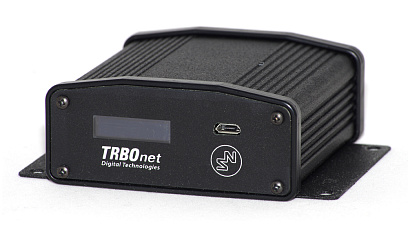

RoIP Gateway A200


Features
This is the right solution if you want to connect one or more remote control (donor) radios located far from the control room.
Remote Control Room
Remote control radios
Latency up to 1800 ms
Analog and digital radios
Smooth Migration
LAN connection to server
Cross-patching
Seamless integration
Reliable and Resilient
Unattended operation
Connection status
Challenging environments
Compatibility
Non-MOTOTRBO radios
SLR5500 in analogue mode
DR3000 in analogue mode
IP Gateways
A200 belongs to the category of devices called RoIP (Radio over IP) gateways. This implies that it connects dispatchers through to various radio resources. A200 has been designed to work in conjunction with control radios, also called donor or gateway radios, or control stations. Depending on the type of the radio system connected to TRBOnet Enterprise or PLUS, the IP Gateway is capable of handling voice and/or data. A200 uses Ethernet (LAN), which makes it possible to install it remotely for the server. There are many possible cases where Swift IP Gateways can be deployed, including but not limited to the following scenarios
Scenario 1: Remote Control Radio
You may have a local system and a remote control radio that you want to monitor. This remote radio can be hundreds of kilometres away from the dispatcher seat. Unfortunately, it is not possible to connect the remote radio to the server with a USB cable that long. The IP gateway makes it possible to use a LAN connection rather than USB. You can just put it nearby your mobile radio and connect it to your IP network. Each IP Gateway is able to work with one channel (voice or data).
Scenario 2: High Latency Environment
The IP gateway can work with latencies up to 3000 ms, which does compare to 60/90 ms recommended by the MOTOTRBO System Planner. If part of your MOTOTRBO radio network is located in such a challenging environment, it can be connected to your server using IP Gateways, one per channel.
Scenario 3: Radio System on Control Radios
If you intend to build a MOTOTRBO radio network based on control radios, you may run into a few problems. First of all, you may not have enough USB ports in your PC to plug all of them into it. On the other hand, a USB cable per se cannot be considered as a very reliable means of connection. This is why the more control stations you plug in, the more potential points of failure there are in your system. Finally, donor radios for voice channels must be connected to sound cards, each gateway radio to the corresponding sound card. It is becoming increasingly difficult if you have to connect three or more control stations. Swift IP Gateways do not require USB ports, nor do they need sound cards. The LAN connection is by far more reliable and resilient.
Scenario 4: Analog-to-Digital Migration
Last, but not least. If you decided to migrate from analog to digital, it may take a few years to purchase and install MOTOTRBO infrastructure and effectively replace all the components of the legacy radio network. This means that you can have both analog and digital radio subscribers on your network for quite awhile. At the same time, you want both types of radio users to communicate with each other during the migration period. In this case you can use our gateways to interface your MOTOTRBO radio network to the legacy system, thus creating an analog radio network over IP. You will require one analog control radio per each analog channel you want to monitor (note that your analog donor radio must be compatible with Swift IP Gateway). The essence of the solution is that you can use cross patch to automatically link digital and analog channels to provide seamless communication across different radio networks.
IMPORTANT NOTICE
1. Due to changes introduced by Motorola into recent MOTOTRBO firmware, we do not recommend you to use Swift IP Gateways A001, A002 and A200 in the wireless (NRF) mode in conjunction with MOTOTRBO radios that have firmware version 2.60 and higher. The latest firmware that can be used in this mode is 2.05.60. The A200 Gateway can work with newer firmware in the wired (USB) mode. Please do not update your control radios beyond this version number if you have A001 or A002 in the wireless (NRF) mode.
2. Swift IP Gateways A001, A002 and A200 in the wireless (NRF) mode do not support revert channels and data repeaters. The A200 Gateway in the wired (USB) mode must be used instead.
3. We do not recommend to install any Swift IP Gateways in the same subnet as trunked repeaters (applies to Capacity Plus and Linked Capacity Plus).



Reviews
There are no reviews yet.